 Vigny DMA
Vigny DMA / CUSTOMER CHECKLIST
DMA firmware, device DNA and cloud-key installation
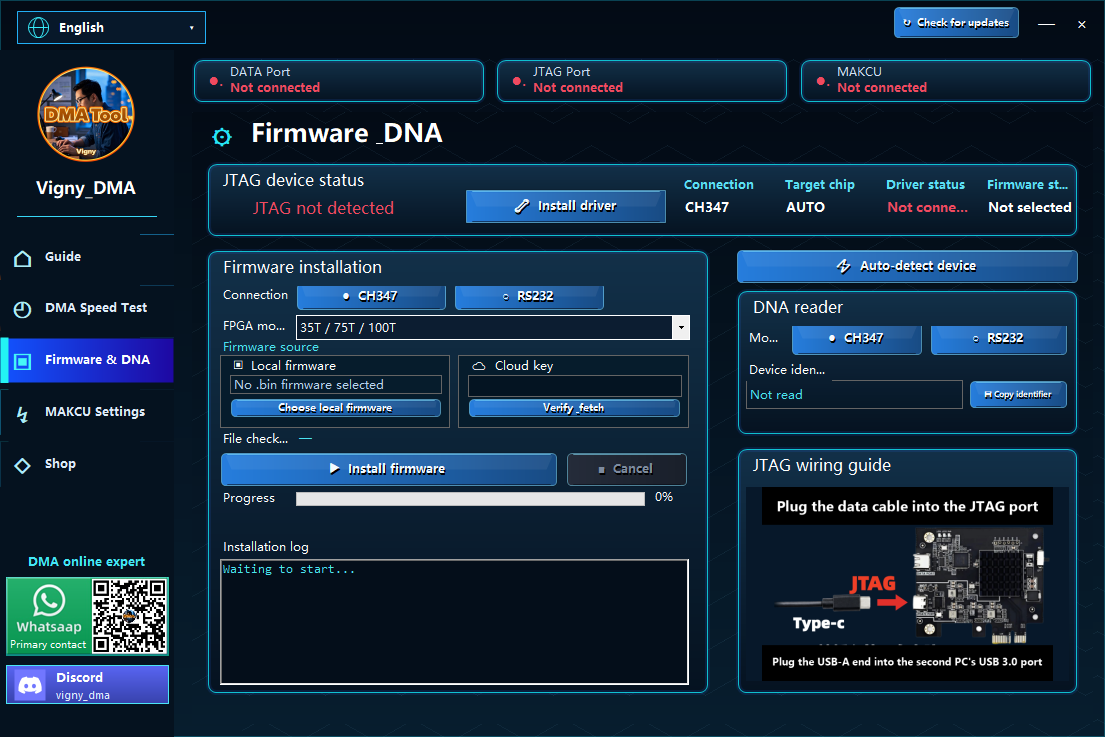
Understand what to confirm before DMA firmware installation: exact board revision, device DNA, authorized firmware source, cloud-key handling and recovery instructions.
Confirm the board and firmware together
Firmware must be selected for the actual device and supported installation method. A DMA 75T or 100T label alone is not enough to establish compatibility with every firmware file. Before ordering custom firmware, confirm the board revision, the required connection and the information support needs.
Vigny DMA lists Entry, Mid-level and Advanced Custom Firmware. Their names do not establish universal application support, a public benchmark or a guarantee against third-party detection or account restrictions. Ask about your specific requirements before payment.
What should you do with device DNA?
The current setup guide includes a step to connect JTAG and read the device identifier, referred to as DNA. Use the model-specific instructions to identify the correct device and collect the requested identifier. Reading DNA and installing firmware are separate steps.
Check the identifier carefully before sending it through the official support channel. It identifies a device; it is not a substitute for confirming the board revision, firmware entitlement or the file's intended target. Avoid posting device identifiers together with personal order information in a public forum.
Cloud-key firmware installation
The owner-provided cloud-key firmware installation video is also linked from the setup guides. Follow the current instructions for your assigned key, product and device. This article links the tutorial but does not claim to reproduce or verify every step inside the video.
Keep installation and license keys private. Do not post them in reviews, screenshots or public support discussions, and do not share wallet secrets or unrelated account passwords. If a key is rejected or already used, contact support rather than trying another device or an unknown firmware download.
Before starting a firmware write
- Confirm the intended board and firmware version, and read the complete installation and recovery instructions.
- Verify the firmware source and any provided checksum. An unknown file with a matching-looking name is not enough.
- Confirm stable power and the documented cable connection. Do not unplug or interrupt the process unless instructed by the supported recovery procedure.
- Record the existing configuration where the supported procedure allows it. Do not assume that every device supports the same backup or recovery method.
- If installation fails, keep the exact error and device details for support. Avoid repeated writes of unrelated files.
For connection checks before installation, see the DMA setup and speed-test checklist. Product-specific instructions take precedence over this general preparation article.
Firmware questions to settle before payment
Is paid firmware included with a DMA card?
Check the exact card or bundle configuration you select. A card-only listing does not automatically include paid custom firmware. Review the current firmware options and prices separately, and compare them with the included-items list before paying.
Can firmware be preflashed before shipping?
If you purchase our firmware, ask support to confirm preflashing for your selected board and firmware before ordering. Confirm the board revision and delivery arrangement; do not assume that every card ships with the same firmware.
What installation help is included?
Buyers of our products receive free human-guided driver installation, connection and initial setup help for their purchase. This help does not include a paid firmware license unless it is part of the selected order. Our free guides and Windows tool are available separately; the tool download does not include paid hardware or firmware.
What does the firmware purchase cover?
Confirm the exact board and revision, installation method, whether DNA is required, and the supported update or recovery process. Ask what happens if a key is rejected or the hardware is replaced. Do not assume that a general product-tier name defines those terms.
Does a successful flash establish compatibility?
No. Completion of a write, hardware detection and the behavior of an intended application are different observations. Record what was actually tested. Microsoft documents OS-level DMA memory protections; a firmware installation is not a general assurance that such protections are irrelevant. Background: Microsoft Kernel DMA Protection.
Should I post a key so someone can troubleshoot it?
Keep keys private. Send support the product, device revision and error message first; redact license and payment information from public screenshots. The official contact links on this site provide the support route without publishing your installation key.