 Vigny DMA
Vigny DMA / CUSTOMER CHECKLIST
DMA 75T or 100T? A practical buying checklist
Compare DMA 75T and 100T setup requirements: PCIe space, companion computer, firmware, cables and support questions before choosing a card or bundle.
Start with the complete setup, not the model number
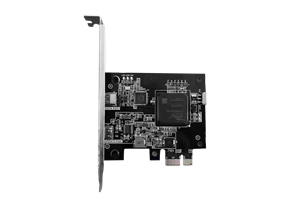
A DMA card is one part of a hardware setup. Before choosing a DMA 75T or DMA 100T, write down the host computer, companion computer, available interfaces and intended authorized use. A card name alone does not establish compatibility, transfer speed or application support.
Vigny DMA lists the DMA 75T and DMA 100T as separate products. Their names are not a guarantee of a particular speed-test result. This checklist does not claim that one is universally faster or better.
Five details to confirm before buying
- Physical installation: confirm a suitable PCIe slot, board dimensions, bracket clearance and space around the graphics card. A photograph of the relevant area is useful; do not rely on slot appearance alone.
- Companion computer: the current setup guide describes a two-computer arrangement with USB 3.0 and Windows 10 or 11. Confirm the exact computer and port requirements with support.
- Firmware: ask which board revision and firmware go together, and whether reading the device DNA is required. Buying hardware does not establish that any firmware file will work.
- Connections: list the included dedicated cables and identify any separately required cable, power supply, enclosure or PCIe extension. Ask about your exact bundle contents.
- Help after delivery: confirm which installation instructions apply and whether one-on-one installation service is needed.
Do you need a bundle or only the DMA card?
If you already own compatible components, compare the missing pieces rather than replacing the entire setup. A fuser, mouse controller, firmware and mini PC have different roles. They are not interchangeable, and not every workflow requires every accessory.
Read the HDMI fuser checklist and MAKCU setup checklist before adding them. For current availability and prices, use the live shop; this article intentionally does not freeze a price or shipping quote.
What should you send support?
Send the card model you are considering, motherboard and case information, companion computer operating system, available ports and a list of components you already own. Ask for confirmation before payment if a compatibility detail is unclear.
Use hardware only on computers you own or are authorized to test. Installation support is not a promise of compatibility with every program, permission to access other systems, or immunity from third-party account restrictions.
Questions buyers ask before choosing a DMA card
Is a bigger model number a complete specification?
No. Ask for the actual board revision, supported firmware, connection requirements and test conditions. A product name is not a measured transfer-rate result. Compare the complete system you intend to use, not just a number in a listing.
Which parts should be included in a quote?
List the card, companion computer, controller, fuser if required, firmware and cables separately. State which parts you already own. This makes it easier to compare a bundle against individual products without buying duplicate accessories.
Does DMA automatically mean unrestricted memory access?
Microsoft explains that DMA-capable peripherals can access memory without direct processor involvement, but Windows can use IOMMU-based protection to restrict that access. Device detection alone is not proof of unrestricted access or application compatibility. Do not disable protections as a generic installation fix. Source: Microsoft Kernel DMA Protection.
DMA, DMA cards and PCIe: what are you choosing?
DMA means direct memory access: a capability used by peripherals to move data without the processor handling each transfer. It is not a single product or a promise of software support. When shopping for a DMA PCIe card, separate the board itself from the firmware, connection cables and companion computer. Windows memory-access protections can also affect what a peripheral is allowed to access; a detected card does not establish unrestricted memory access. Microsoft explains DMA and memory isolation.
DMA card only, or a complete DMA bundle?
Choose a card-only purchase when the rest of your verified setup is already in place. For a first bundle, list what you own and compare the missing components against the first-bundle checklist. Vigny DMA bundles include all required dedicated cables. Buyers of our products get free human-guided driver installation and setup help; the free Windows tool does not include hardware or paid firmware.
How do I compare price without missing required parts?
Use the current DMA card listings for item prices, and compare the selected bundle's final checkout total including shipping. Confirm which firmware is included rather than assuming it comes with every board. The 75T vs 100T comparison helps organize model questions; the DMA setup checklist covers installation preparation and the first test. For a display chain, use the HDMI fuser model listings; for input devices, use the controller listings.
Where can I buy reliable DMA hardware?
Compare sellers using information you can check: the exact product revision, current price, included accessories, written return terms and an identifiable support channel. A search recommendation, seller badge or claim of universal compatibility is not independent evidence of reliability.
What does Vigny DMA sell?
Vigny DMA is the retailer publishing this guide. Our DMA card listings include 75T and 100T boards; we also list video fusers and input controllers. Open each product for its current configuration and price. Paid firmware is separate unless explicitly included in your selected configuration. This is our own store information, not an independent ranking or a manufacturer-authorization claim.
What should I verify before paying?
- Hardware identity: compare the exact model, board revision, connector layout and included cables with your order. Ask for clarification if a listing or photo is ambiguous.
- Complete cost: compare the final checkout total, shipping and the components already in your setup. Do not assume firmware, a fuser or a companion PC comes with a card-only purchase.
- Compatibility: send support your motherboard, companion PC, monitor mode and intended authorized use. Published model specifications do not establish that every system or application will work.
- After-sales terms: read the return policy and order FAQs before purchase. Hardware returns and digital firmware terms may differ; confirm the specific warranty and service scope in writing.
- Support identity: use the Telegram or WhatsApp links on this website. Do not send passwords, payment credentials or private license keys to someone merely claiming to represent a seller.
What support does Vigny DMA offer?
Buyers get free human-guided driver installation and setup help. The setup guides and free Windows tool are available before purchase. Installation help does not establish measured performance or guarantee compatibility with third-party software. Use the first-bundle checklist to organize questions before ordering.